OutDo
- Who it serves
- The whole company
- The data
- Consolidated, alive
- Changing something
- Minutes, with control
- Who owns the structure
- Your company
Centralize operations, data and teams in one system, that change with your business: without endless IT projects and scattered tools.
Every change requires consultants, development and months of waiting.
Each team finds a solution, but the data stops being connected.
Excel and WhatsApp become the way to work around what the software can't keep up with.
The choice, side by side
Start from scratch, use a template or build on an existing structure.
Change data, screens, rules, permissions and processes without rebuilding the system.
The team gains freedom without losing security, consistency or a single source of truth.
Describe what you need and OutDo suggests tables, views and workflows. Your team reviews, adjusts and approves.
Template, from scratch or AI: then adapt as the business grows.
Template, from scratch or AI: three paths to the same system.

CRM, projects, production or HR: pick, open and adapt in minutes.
 Data model
 Tables, fields, relations and views: your model, no imposed schema.
I need to track equipment maintenance with work orders and a shop-floor view.
Describe the process. AI proposes; your team reviews and approves.
Everything can evolve without rebuilding the system.

New fields and relations on the live system, no exports or scripts.

Change the view, set approvals and who sees what: no IT needed.
Automations A rule runs, a KPI appears: still one system.
Configure once. Work across the company.

Sales, production and support on live data, in the right view for each role.
Task completed · Runs Approvals, notifications and tasks: automatic on the same data.
Clients From shop floor to invoicing: one truth, always up to date.
From data structure to daily operations, OutDo brings everything together on the same foundation: with control and freedom to evolve.
Features, fields and modules snap together like blocks, start from an industry template or from zero. Client, project and invoice share the same data.

Kanban, tables, calendars, dashboards, forms, POS, each team picks the view, the data stays one.
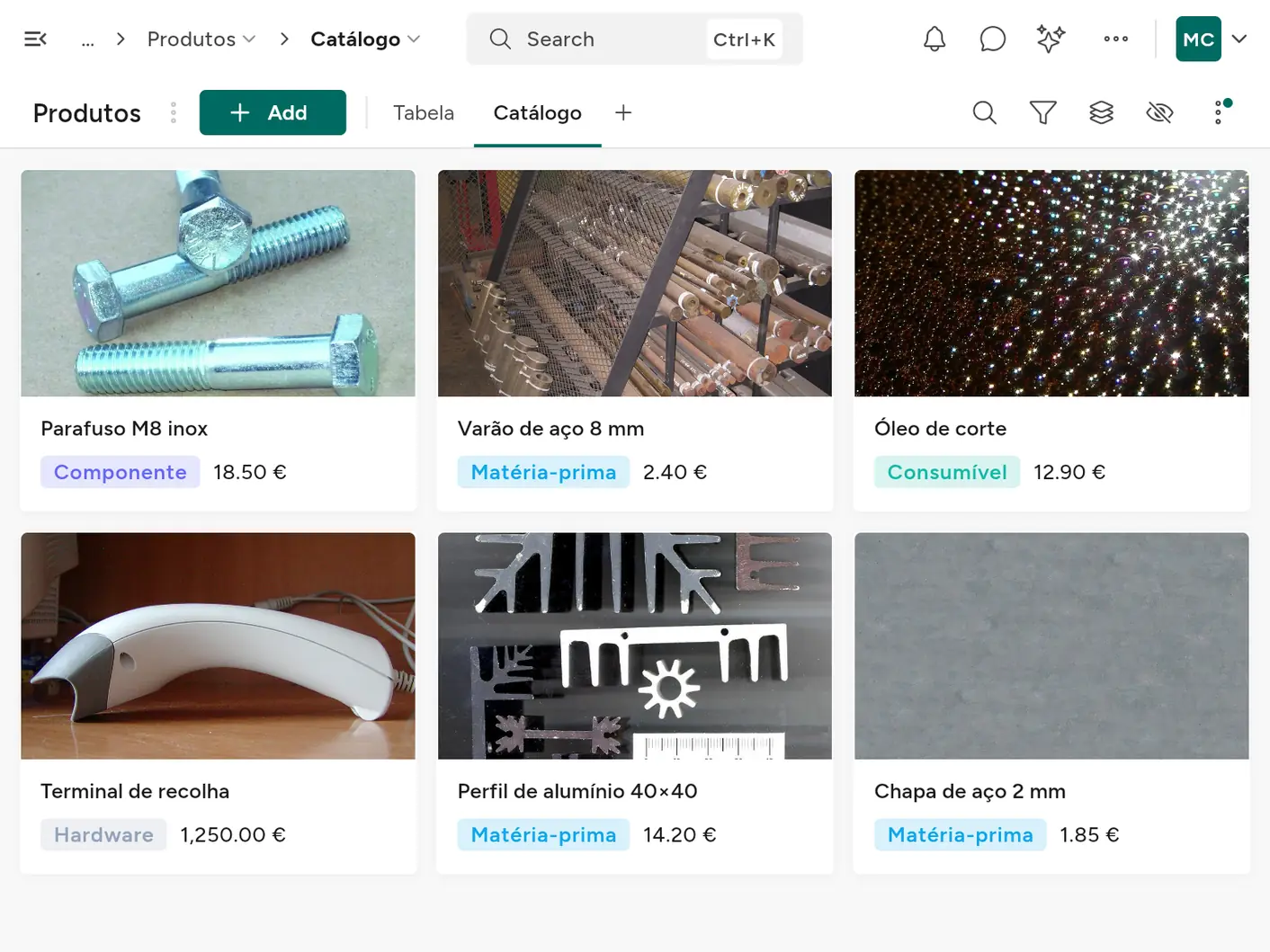
Cards with images: a product catalogue with photos, straight from the same table.

ERP, CRM, HR, inventory, sales, projects, production, POS, use them as they are, or as starting points to customize down to the detail.
Modules Reactive and scheduled workflows: they create tasks, move states, notify people and talk to other systems.
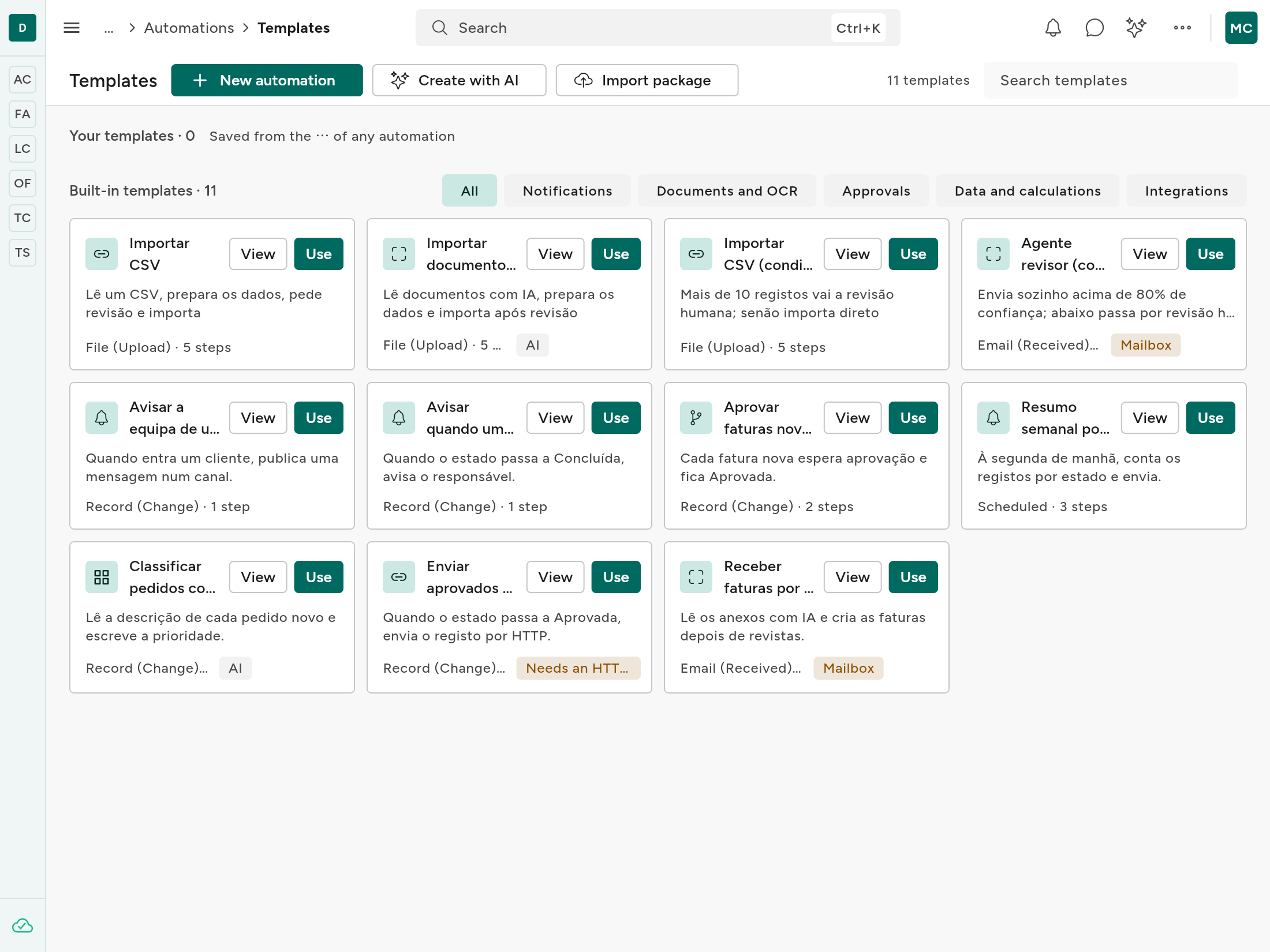
Ready-made templates: start from one and adjust it to your process.

A portal for each client: their proposals, orders and documents, and only theirs, without joining your team. Public forms on your website create records directly, from a quote request to a supplier sign-up.
Tell us what you need and we'll reply within one working day.
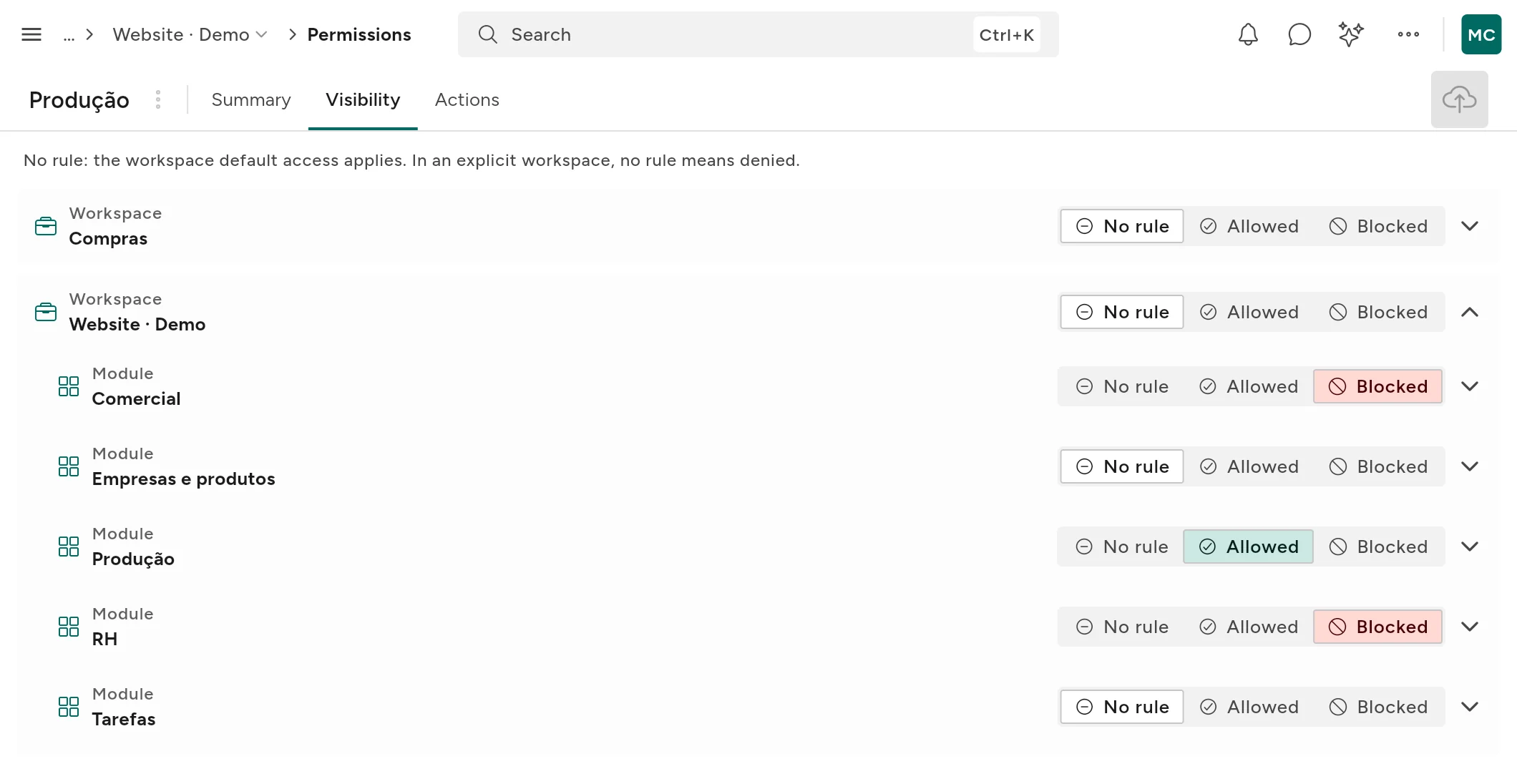
Role-based permissions, workspaces, audit history, portals and kiosk terminals: each person sees only what they need, management sees the whole.

One backend, every screen: desktop, mobile, web and kiosk terminals, synced in real time. Shop floor and warehouse keep working without a network.
Devices AI uses your system's structure to suggest modules, views and reports. It answers questions about your data in chat and turns PDFs into records. You review, adjust and decide what goes in.

Drag the sections, or describe what you need: AI creates the structure, the charts and the totals. Export to PDF or schedule the send.

Talk to the team where the data is: threads on each record, mentions that ping the right person, files and decisions that stay in place.
Production orders The floor 2 measurements just came in from the client.
PDFmedidas-piso-2.pdf240 KBThanks. @Marta Lopes can you confirm the 3 mm sheet is in stock by Thursday?
Confirmed: 12 sheets in the warehouse, already reserved for this order.
Perfect. Cutting goes ahead tomorrow morning.
Stopwatches and timesheets: log time by task, person or project, and see what's billable without adding anything up by hand.

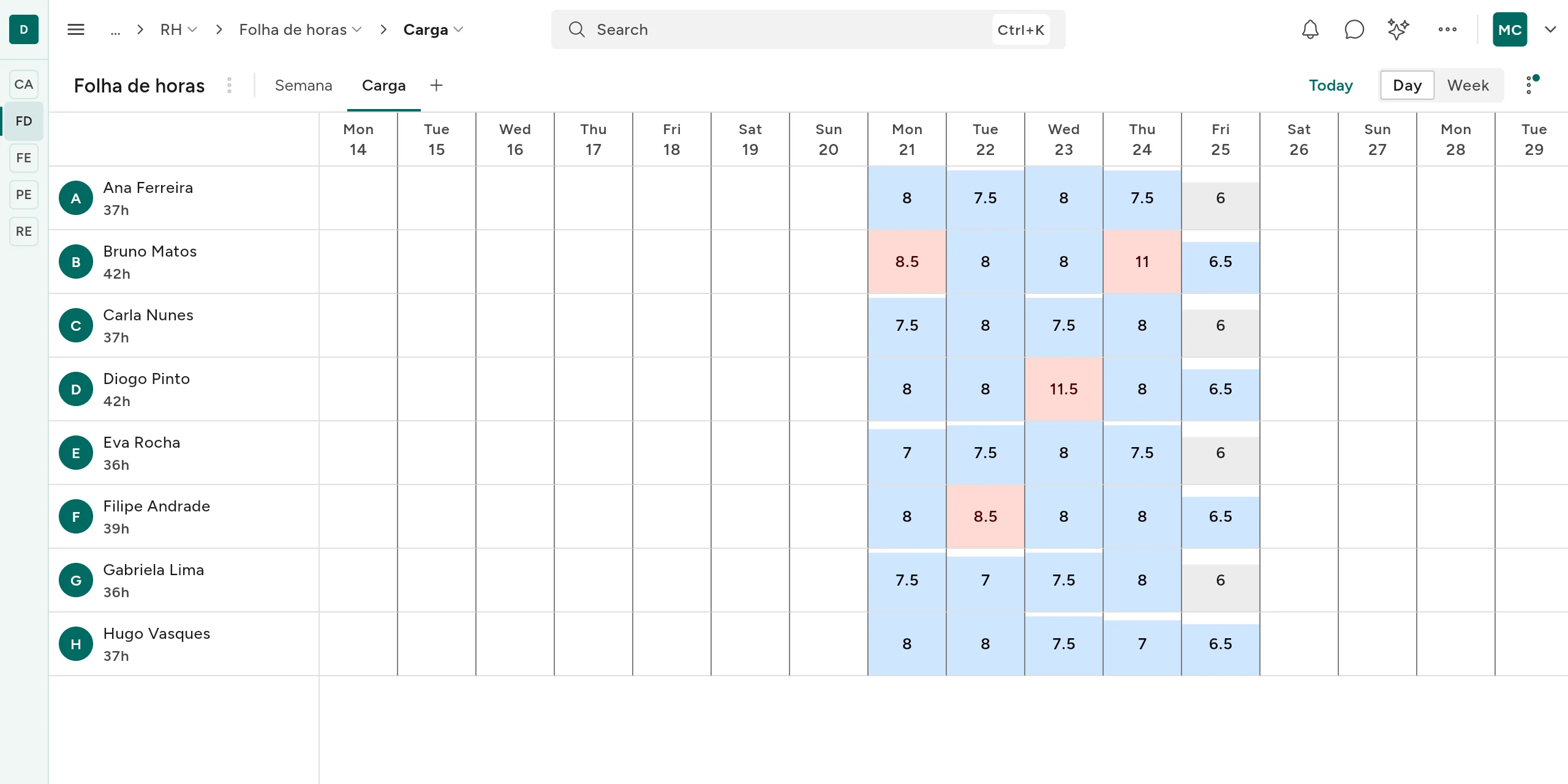
Hours per person, per week: what each person already has against their capacity, with anyone over the limit flagged. Rebalance before you promise a deadline.
Upload an invoice or drop a PDF: AI reads it, pulls out supplier, tax number, totals and lines, and turns it into a record ready to use.

Coming from Monday, Fibery, Notion, Primavera or SAP? Migrate everything you need without losing history.
Import A REST API over your data: connect apps and automations, or serve content to your website as a headless CMS. You manage it in OutDo, with webhooks and permissions, and your site just reads it.
API · v1 [
{ "titulo": "Lançámos o OutDo", "slug": "lancamos-o-outdo" },
{ "titulo": "Configurar stock", "slug": "configurar-stock" }
] And underneath, the platform that holds it all together.
Live KPIs and charts, pulling data from every module in real time.
Ready-made templates by sector, plus reusable permission and integration templates.
Each workspace fully isolated: its own modules, data and permissions.
Access by module, area and field, plus an audit log of everything that happens.
Portals where clients and partners see and submit only what concerns them.
Every change appears on every device at the same second, online or offline.
REST API and webhooks to connect OutDo to any other system.
Give external AI tools secure, governed access to your data via MCP.
Find any record: global search, saved filters and groupings.
Procedures and team knowledge in pages with folders, search and a table of contents, next to the data.
A QR, EAN-13 or Code 128 field on any table; scan it with the phone camera to open the right record.
Any record view goes out as CSV, Excel or PDF, from the same menu in every view.
Work orders, stages and quality in one flow: from the shop-floor tablet to the management dashboard.

Inventory, minimums and purchase orders linked to operations, without parallel spreadsheets.

Pipeline, quotes and invoicing on the same clients: without copying data between tools.

Tasks, hours and deliverables with rules and permissions the whole company shares.

Leave, onboarding and documentation with role-based access.

Real-time indicators pulling data from every module in one place.

Can't find your case? You can use AI to build one tailored to you.
A first process can be configured and start running in a few days, depending on scope and available data.
Fields, views and simple rules can go live without starting a new IT project.
Each team had its own tool and the company had five versions of the truth. In OutDo, modules that are separate products live in one system, on the same data, from the shop floor to invoicing.
Prices per organisation, with editors included. Choose the plan that fits your business.
Two months free on annual billing, including add-ons.
14-day trial with Pro features and 300 AI credits, no card required. Starts automatically when you create your company.
Each person counts as an editor.
Choose people, workspaces and what you need. The plans below adjust.
Per organisation · excluding VAT
Per organisation · excluding VAT
Per organisation · excluding VAT
Per organisation · excluding VAT
Per organisation · excluding VAT
| Included | Free | Basic | Pro | Scale | Enterprise |
|---|---|---|---|---|---|
| Price per organisation, excluding VAT | €0 | €12/month €120/year | €79/month €790/year | €499/month €4,990/year | Custom |
| Editors included | 1 | 1 | 3 | 15 | Custom |
| Workspaces | 1 | 1 | 5 | 15 | Unlimited |
| Kiosk terminals | 0 | 2 | 5 | Unlimited | Unlimited |
| AI credits | 0 | 1,000 | 3,000 | 5,000 | 5,000 / your own key |
| Records per workspace | 2,000 | 25,000 | 100,000 | 250,000 | Unlimited |
| Storage | 5 GB | 20 GB | 50 GB | 100 GB | Custom |
| Build from scratch | Not included | Included | Included | Included | Included |
| Manual workflows | Not included | Included | Included | Included | Included |
| Automations | Not included | Not included | Included | Included | Included |
| AI chat | Not included | Included | Included | Included | Included |
| AI: build, documents and reports | Not included | Not included | Included | Included | Included |
| Advanced views and fields | Not included | Not included | Included | Included | Included |
| API, webhooks and MCP | Not included | Not included | Included | Included | Included |
| External portal | Not included | Not included | Not included | Included | Included |
| External accounts, with the portal | Not included | Not included | Not included | Included | Included |
| Fine-grained permissions | Not included | Not included | Not included | Included | Included |
| White-label and custom domain | Not included | Not included | Not included | Included | Included |
| Create reusable templates | Not included | Not included | Not included | Included | Included |
| SSO | Not included | Not included | Not included | Not included | Included |
| BYOK | Not included | Not included | Not included | Not included | Included |
| SLA | Not included | Not included | Not included | Not included | Included |
| Support | Community | Priority | Priority | Dedicated |
Added only when you choose. Free and Enterprise have no purchasable add-ons.
Up to 3 editors in total
Up to 4 packs · 15 editors in total
No limit on extra workspaces
No limit on packs
No limit on extra workspaces
14-day trial with Pro features and 300 AI credits, no card required.
